

Easy Sidechain
Spectral sidechain ducking. Only where they collide.
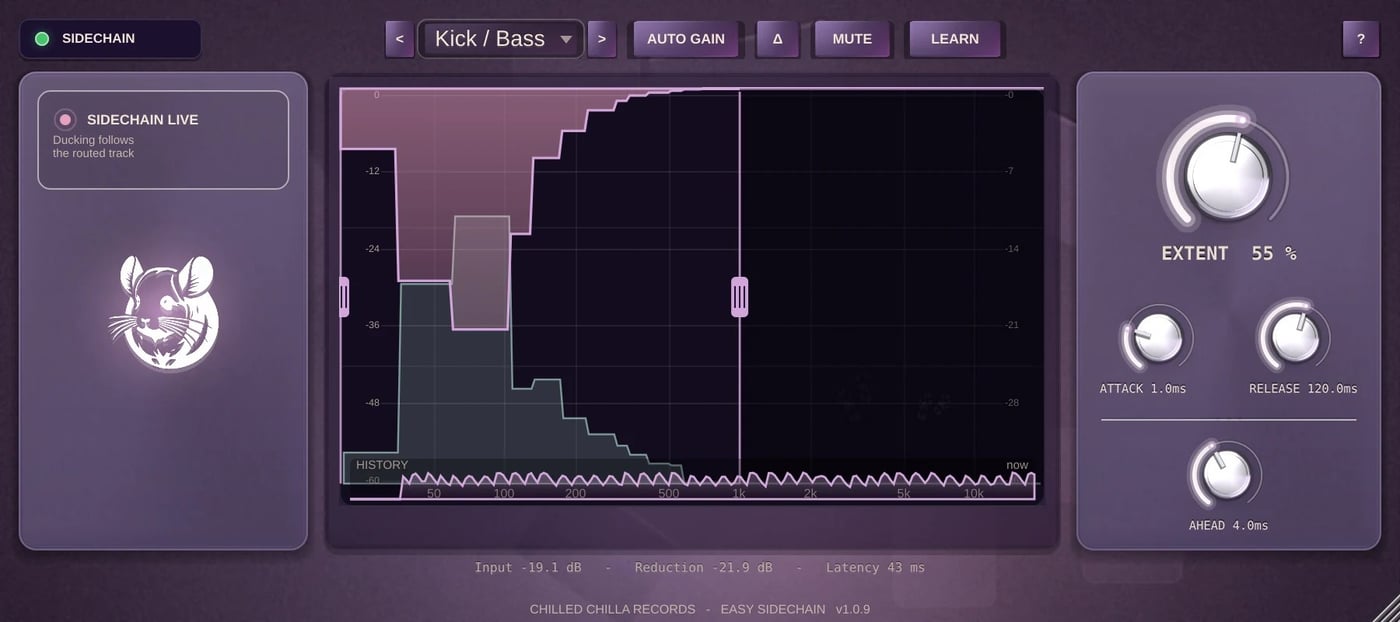
Your kick hits and the bass makes room, but only in the frequencies the kick needs. The rest of the bass keeps its body. No pumping, no hole in the low end.
Windows and macOS · VST3 and Audio Unit · one licence for three computers
See it in 40 seconds
Hear the difference
Stems from “Jingles” by Hary.BoY & Rato (Chilled Chilla Records), processed with Easy Sidechain itself. Press play and switch between Before and After while it runs. Both versions play in sync at the same loudness.
Kick → Bass
Factory preset Kick / Bass. The bass gives way only under the kick and keeps its body in between.
Snare → Chords
Factory preset Snare / Guitars. The chords open up in the mids exactly when the snare hits.
The whole beat
All of it: drums, bass, chords, piano, euphonium and atmos, with both settings above.
Made with Easy Sidechain 1.0.9, factory presets unchanged, both versions matched in loudness. Four bars at 70 BPM. In “Kick → Bass” and in the whole beat the bass is 9 dB louder than in the released mix, so that it really collides with the kick.
What it does
Only where they collide
Compares both signals in 40 frequency bands, many times per second, and lowers your track only where the trigger sits on top of it.
Any trigger
Kick into bass, snare into guitars, vocals into pads: whatever you route into the sidechain input.
LEARN
Listens to your song for about eight seconds and suggests a starting point in three strengths.
20 factory presets
Ten for sidechain jobs, ten for cleaning up a single track, plus your own.
DELTA
Hear only what is being removed. The quickest way to check your settings.
Sidechain lamp
Green, amber or red: shows at a glance whether your routing works, the most common setup mistake.
A closer look
Details
- Formats
- Windows: VST3, 64-bit. macOS: VST3 and Audio Unit, Apple Silicon and Intel.
- Works in
- Ableton Live, FL Studio, Logic Pro, Cubase, Studio One, Reaper, Bitwig Studio and other hosts with sidechain inputs.
- Tracks
- Mono or stereo. The sidechain input is optional; without it, the clean-up presets work on the track alone.
- Latency
- 2048 samples (46 ms at 44.1 kHz), compensated by your DAW.
- Licence
- One licence, up to three computers at the same time. Activation online.
- Trial
- 7 days with every function, started in the free Chilled Chilla Hub.
Questions
How do I route the sidechain?
Put Easy Sidechain on the track that should make room, for example the bass, and send the trigger, for example the kick, into its sidechain input. The manual in the Chilled Chilla Hub shows the steps for each DAW, and the lamp in the plug-in turns green when it works.
Do I need the Chilled Chilla Hub?
The Hub installs, activates and updates Easy Sidechain with one click and starts your free trial. If you prefer, you can also download the installer from your account in our store after buying.
Does it need the internet?
Activating needs an internet connection. After that, Easy Sidechain works offline and confirms its licence online from time to time.
Can I get my money back?
Yes. Within 14 days of your purchase, no questions asked. Write to support@chilledchillarecords.com. Details: Refunds.
Is there a free version?
Easy Sidechain Lite is free: one knob, the same engine. Get it on our Hub & Plugins page.
Learn the technique
Free guides from the label, with or without the plug-in.
Make room in your mix
Try every function free for 7 days in the Chilled Chilla Hub, then keep it for good.